Face Weighted Normals in Maya Tutorial & Script
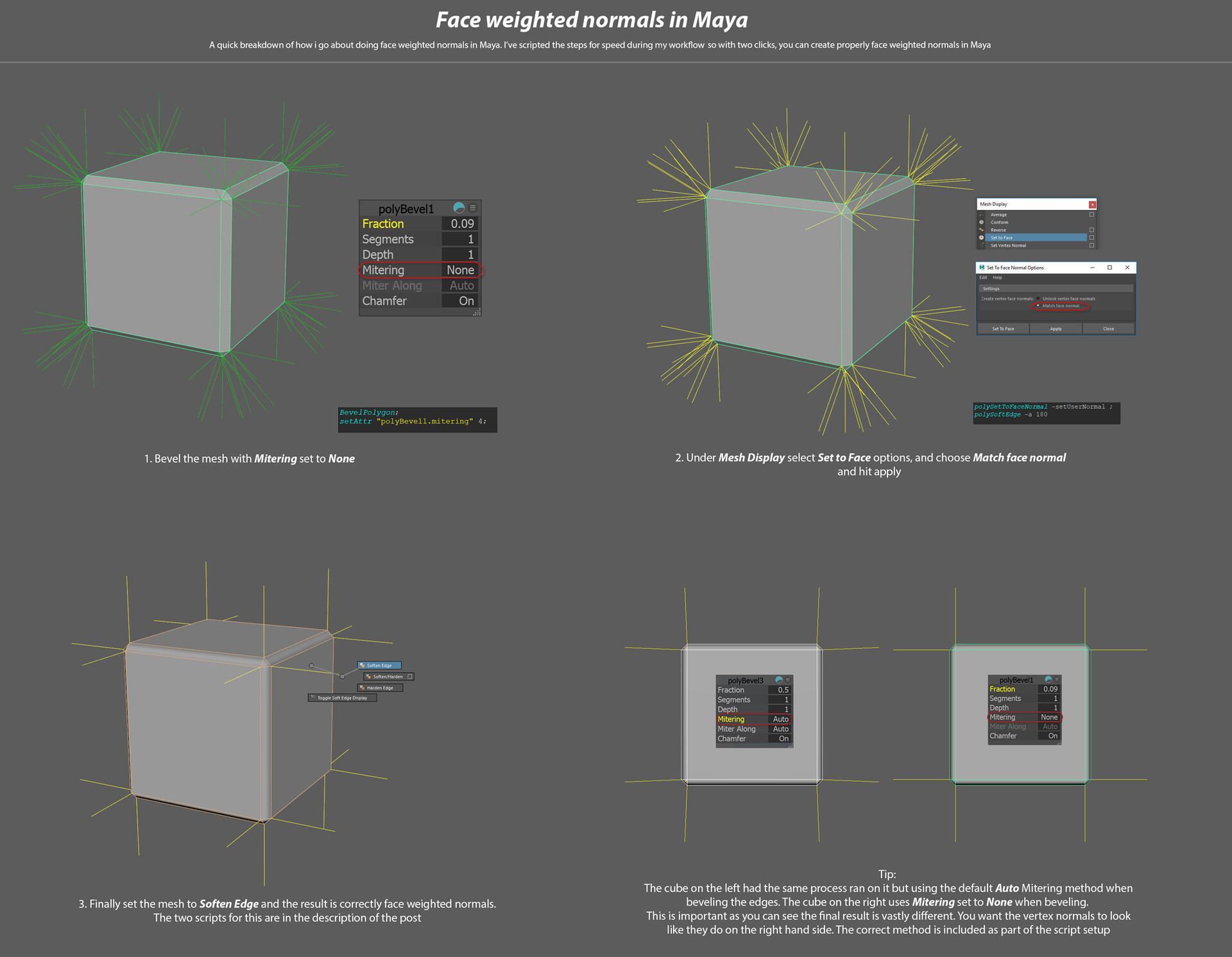
I wanted to post a simple breakdown of the face weighted normals method in Maya as i usually forget stuff like this so thought i'd keep it here. The image is self explanatory and makes it look more long winded than it is, the actions performed were simple menu options but i've condensed them into two simple scripts that can be kept on a shelf or assigned to hotkeys for speed.
The first script does the intial bevel with the correct mitering method as mentioned in the image this has to have mitering set to none.
The second script sets the vertex normals to match the face normal and then softens the edges, resulting in the finished mesh with correctly face weighted normals.
Just copy these to the mel window and drag them to the shelf
Script 1 - Bevel with Mitering set to None:
BevelPolygon;
setAttr "polyBevel1.mitering" 4;
Script 2 - Set to face and soften edges
polySetToFaceNormal -setUserNormal ;
polySoftEdge -a 180
If anyone has a better method or any feedback please let me know! Always want to learn more :)